
Limits and costs
What Cloudflare's free plan includes, what Huddle uses it for, and what happens if your team gets close to a limit.
Huddle is built to run for free on Cloudflare’s free plan. This page explains what the free plan includes, how to see how much you’re using, and what happens if you get close to a limit.
The short version
- For a typical small team, Huddle costs nothing to run.
- Cloudflare needs a payment card on your account before it switches on file storage, but storage is free up to 10 GB.
- Owners and admins can see how much they’re using in Admin › Usage.
What the free plan includes
Cloudflare gives each account a free allowance every day. Huddle uses several of Cloudflare’s services, each with its own name:
| Cloudflare service (what it is) | Free allowance | What Huddle uses it for |
|---|---|---|
| Workers (runs the app) | 100,000 requests a day. A request is the app asking for something, like loading a channel or sending a message. | Everything people do in Huddle |
| D1 (the database) | 5 million rows read and 100,000 rows written a day. 500 MB per database, 5 GB in total. | Storing and finding messages, people and settings |
| Durable Objects (live updates) | 100,000 requests a day | Making new messages appear instantly, and sidebar counts |
| Queues (a to-do list for background work) | 10,000 operations a day | Sending email summaries and phone notifications |
| R2 (file storage) | 10 GB of storage, free downloads | Shared files and your logo |
| Cron triggers (timers) | Included | One tidy-up run every hour |
Cloudflare sets these limits and can change them, so check Cloudflare’s pricing pages for the latest numbers.
Loading the app itself (its pages, pictures and code) doesn’t count towards the daily request allowance.
Limits Huddle adds
Huddle has a few limits of its own, to protect your free allowance and your team:
| Limit | Amount | Why |
|---|---|---|
| Messages per person | About 60 a minute | Stops a broken script or a misused account flooding the chat |
| Messages from a webhook (another tool posting) | 30 a minute | Stops a faulty tool flooding a channel |
| File size | 25 MB, up to 10 files per message | Keeps storage under control |
| Unread counts | Shown up to 99+ | Counting thousands of unread messages on every visit would use up the free allowance |
| Email summaries | Paused for the day after 80 emails | Leaves room in Gmail’s daily limit for sign-in codes and invitations |
| Slack import | 20,000 messages a day | Each imported message uses several database writes |
| Phones and computers with notifications | 10 per person | The oldest are dropped after that |
See how much you’re using
Open Admin › Usage (owners and admins). It shows:
- Database: how much space your messages take, out of 500 MB.
- File storage: how much space shared files take, out of 10 GB.
- Emails sent today: out of the daily budget of 80.
- Messages imported today: out of 20,000.
- Totals: active members, messages and files.
If the database or file storage goes past 80%, or today’s emails are nearly used up, a warning appears at the top of the page.
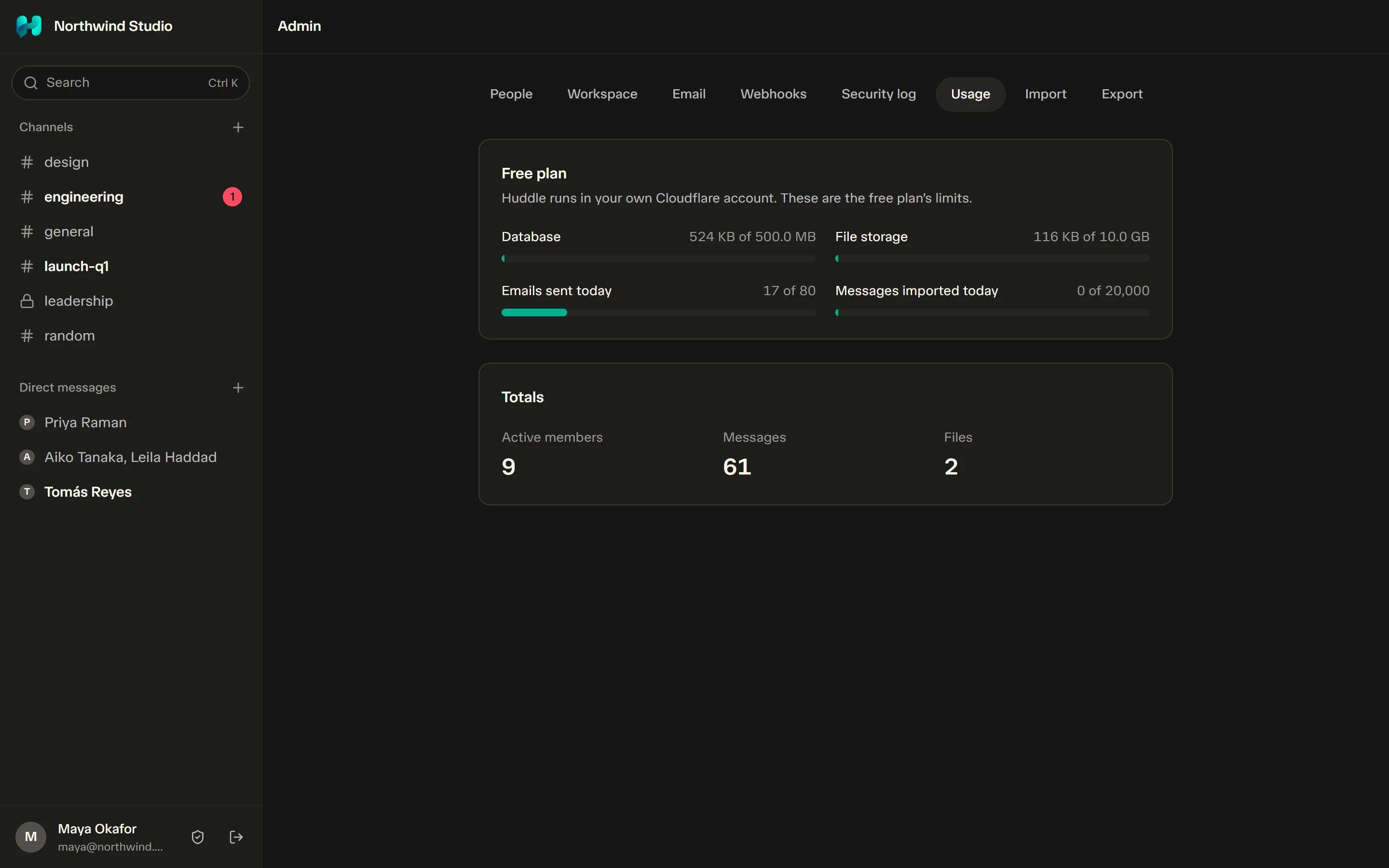
For the daily request counts, look in your Cloudflare dashboard: Workers & Pages shows requests, and Storage & Databases › D1 shows database reads and writes.
What happens if you reach a limit
- Daily limits start again at midnight UTC (that’s midnight in London in winter). Until then, Huddle may not load or send messages.
- Storage limits don’t reset. Deleting a message removes its text but keeps its files, so watch Admin › Usage and move to a paid Cloudflare plan before you run out.
- Emails over the daily budget wait until the next day. Nothing is lost.
If your team outgrows the free plan, Cloudflare’s paid Workers plan raises these limits. Huddle works on it without any changes.